I used to treat real time lead qualification cost like a line item. Then I watched a website lose three good demos in one afternoon because nobody replied for 19 minutes. That was the wrong metric. The real cost shows up in speed, labor, and missed intent, especially for teams that qualify leads manually and only check forms during business hours.
Real time lead qualification cost is the total price of identifying, routing, and converting a lead the moment they arrive, including software, setup, human review, and the revenue you lose when response time drifts. If you sell through your website, this matters because the fastest team usually wins the first conversation, not the cheapest tool. In this article, I’ll break down what drives that cost, where AI changes the math, and how to tell whether automated lead capture is actually saving money or just moving expenses around.
What is real time lead qualification cost?
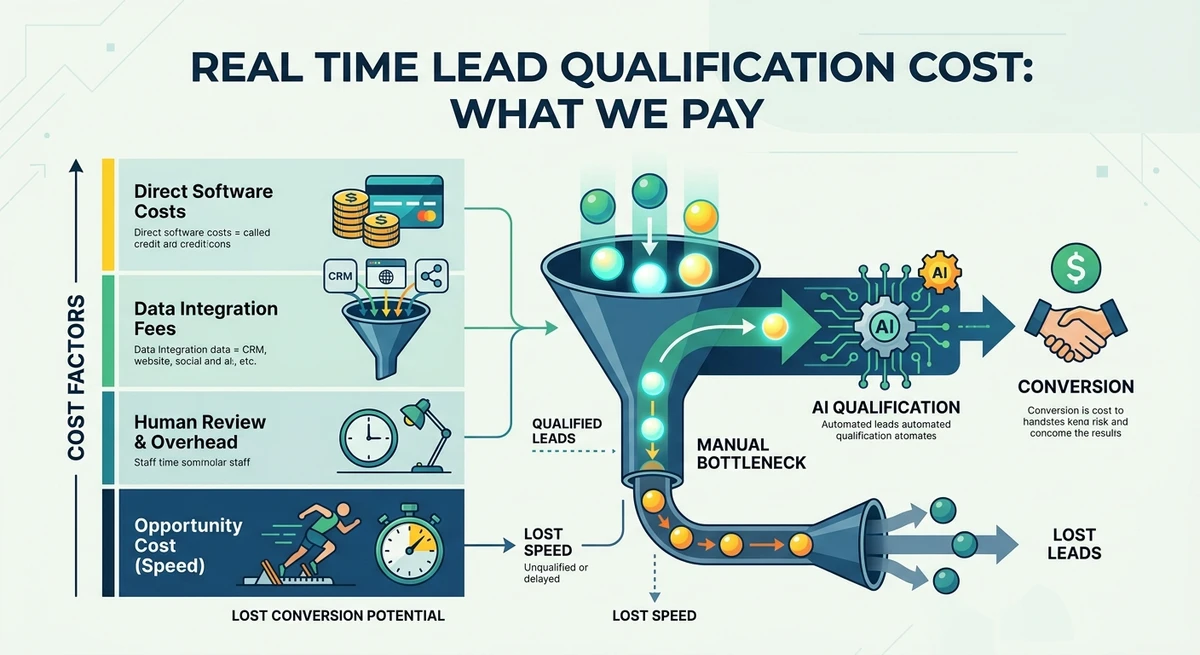
The direct answer is simple: real time lead qualification cost includes everything you spend to capture a lead while they’re still active, plus the revenue leakage from waiting too long. For agencies and B2B teams, I separate it into four buckets, software, implementation, human handling, and delay cost. That last one is the one most dashboards ignore. If your average qualified lead is worth $2,500 and you lose one out of ten because the response came an hour late, your effective cost rises fast.
Think of it as a speed tax. The longer a visitor sits with unanswered intent, the more you pay in lower conversion rate, duplicate follow-up work, and rep time spent on low-fit leads. In practical terms, a team spending $800 a month on tools can still have a higher real time lead qualification cost than a team spending $2,000 if the second team cuts response time from 12 minutes to 12 seconds. That’s why this metric only makes sense when you include revenue impact, not just software invoices.
Formula: Real Time Lead Qualification Cost = Software + Setup + Labor + Delay Loss
Why do most teams underestimate the cost?
Most teams look at the tool price and stop there. That’s where the math breaks. I’ve seen agencies proudly say they “only spend $99 a month” on lead capture, then burn six hours a week on manual triage, follow-up tagging, and lead cleanup. At even a modest $45 hourly cost, that’s about $1,080 a month in labor before you count missed opportunities. According to HubSpot’s published sales response-time research and CRM guidance, speed to lead has a measurable effect on conversion, which lines up with what we see in live websites every week.
Delay is the hidden budget killer. A lead who waits 10 minutes feels ignored; a lead who waits 24 hours often feels cold. That’s why the cheapest stack can become the most expensive one. One agency we worked with had a form, a shared inbox, and a Monday-only review routine. They were paying almost nothing in software, but they were losing booked calls because 40% of inbound prospects never got an answer while interest was still high. The cost wasn’t their form tool. It was the gap between intent and action.
How does AI lead qualification change the math?
AI lead qualification changes the math by shrinking the time between visitor intent and first useful response. Instead of waiting for a human to read a form, the agent asks the next best question, scores the fit, and routes the lead immediately. That turns lead qualification from a batch task into a live conversation. For many teams, that means fewer hours spent sorting junk and more qualified opportunities handed to sales while the visitor is still engaged.
What matters is not automation alone, it’s timing. A chatbot that just deflects questions doesn’t lower cost much. An AI agent that adapts to behavior, asks relevant questions, and collects the right fields can cut manual handling sharply. We’ve seen teams shorten qualification from several minutes of back-and-forth to under a minute of active interaction, which is enough to preserve intent. That’s also where the revenue side changes: the lead doesn’t feel processed, they feel recognized. In our work, that difference shows up in higher form completion, better fit, and fewer dead-end handoffs.
Formula: Revenue Lift = Qualified Leads x Response Speed x Fit Accuracy
Which costs are fixed, and which ones move?
When I audit a lead qualification stack, I split costs into fixed and variable buckets. Fixed costs are the platform fee, initial setup, and workflow design. Variable costs are the time your team spends reviewing leads, the number of bad leads that slip through, and the revenue lost from slow response. The mistake is trying to optimize only the fixed cost, because that’s usually the smallest part of the picture over a quarter.
- List every tool in the path from visitor to booked meeting.
- Assign a monthly cost to each tool and to every human hour involved.
- Estimate delay loss using your average deal value and current response time.
- Compare that total to a live, always-on AI workflow.
That third step is the one teams skip. If 100 inbound leads per month generate 20 qualified opportunities and your average close value is $3,000, even a small gain in speed can outweigh a software upgrade. I’ve seen teams keep a cheap stack because the invoice looked clean, while the actual sales cost stayed messy. The real question isn’t “what does the software cost?” It’s “what does one extra hour of delay cost us in booked revenue?”
How do you automate lead capture without losing quality?
The best way to automate lead capture is to make the conversation do the qualifying, not the form. Start with a simple flow: identify intent, ask one relevant question, confirm fit, then route the lead. The AI should adapt based on page behavior, referral source, and answers already given. If a visitor lands on pricing, the conversation should not sound like a homepage greeting. That’s how you keep quality high while removing manual effort.
- Use visitor context before asking anything.
- Collect only the fields sales actually uses.
- Route hot leads instantly, not after a daily review.
- Log every answer into your CRM or workflow tool.
Good automation removes friction without flattening the interaction. One SaaS team I spoke with replaced a five-field form with a short conversational path and saw more complete submissions because visitors didn’t feel trapped in a generic intake funnel. The point isn’t to ask fewer questions for the sake of it. The point is to ask the right question at the right moment, then act on the answer before attention fades.
What is the real cost of manual qualification?
Manual qualification looks cheap until you count the human time and the leads that age out before anyone replies. A rep can spend 8 to 12 minutes per inbound lead on reading context, checking fit, copying notes, and forwarding the right record. Multiply that by 50 leads a week and you’ve filled a real part of the day with admin work. If the lead wasn’t a fit, that time often produces nothing.
Here’s the extractable version: manual lead qualification is expensive because it pays people to do repetitive sorting that software can do in seconds, but it also creates a second cost, which is inconsistency. One rep asks three questions, another asks seven, and the third forgets to log the answer. That inconsistency makes reporting noisy and follow-up slower. In a live pipeline, that noise becomes missed context, slower speed to lead, and a lower chance that sales sees the right signal at the right time. Manual works, but it scales like a bottleneck, not a system.
We built Rioform because we kept seeing that bottleneck. Teams didn’t need more forms. They needed an agent that could qualify visitors in real time, preserve intent, and hand off structured data without making the visitor wait.
How do you measure whether AI lead qualification is paying off?
The cleanest way to measure ROI is to compare pre-AI and post-AI performance over 30 to 60 days. Track response time, qualification rate, booked meetings, and rep hours saved. If your median first response drops from 14 minutes to under 1 minute, you should expect some combination of better conversion and lower labor overhead. The exact mix depends on traffic quality, but the signal is usually obvious within a month.
- Record your current response time, qualification rate, and close rate.
- Turn on AI lead qualification for one high-intent page first.
- Measure booked meetings, fit rate, and hours saved after 30 days.
- Expand only if the agent improves both speed and lead quality.
Don’t judge the system by volume alone. A higher lead count with worse fit can look good in a dashboard and still hurt sales. We’ve found that the best conversational AI for lead capture behaves like a sharp dispatcher, not a louder funnel. It should tell you, quickly, whether a visitor is worth a human’s time.
What should you look for in AI lead qualifying software?
If you’re comparing AI lead qualifying software, the feature list matters less than the workflow fit. I want three things: real-time behavior awareness, flexible qualification logic, and clean handoff into the tools your team already uses. Without those, the software may look smart in a demo and fail on a live site. The hard test is simple: can it qualify a visitor differently on the pricing page, the blog, and the contact page without manual babysitting?
- Behavior-aware conversation, not static scripts.
- Flexible routing by segment, page, or source.
- Workflow integration with CRM and sales alerts.
- Audit trails so you can see why a lead was qualified.
The broader market is moving the same way. People are already debating the limits of AI agents when they’re asked to handle real work, not just demos, and that’s the right lens for buyers too. If a system can’t handle edge cases, it won’t reduce cost, it will just move the manual work somewhere else. That’s the test I use before I trust any agent on a live website.
https://x.com/i/web/status/2047474243139784739
FAQ: What buyers ask before they switch
Is real time lead qualification more expensive than a form?
Usually, the monthly software line is higher than a basic form tool, but that comparison misses the actual economics. A form is cheap to host and expensive to operate when people must review entries, chase incomplete answers, and respond later. Real time lead qualification can cost more upfront, yet it often lowers total spend by reducing manual triage and improving speed to lead. If one qualified meeting is worth more than the monthly tool gap, the math changes quickly. I’d rather pay for live qualification than pay people to sort the same leads twice.
How fast should an AI agent respond to a visitor?
Fast enough that the visitor still feels in the moment. In practice, that means immediate or near-immediate engagement, ideally in seconds, not minutes. If a person has to wait for a response, the qualifying conversation loses momentum, especially on pricing or demo pages where intent is highest. The goal isn’t just speed, though, it’s relevant speed. A response that mirrors the page, the source, and the next logical question will outperform a generic greeting every time. That’s why real-time lead engagement matters more than a canned chatbot script.
What’s the quickest way to reduce lead qualification cost?
Cut manual review first. That usually means replacing forms plus inbox triage with an AI conversation that asks the right questions, scores fit, and pushes the result straight into your sales process. Once the agent handles the first layer, your team spends less time sorting and more time selling. We’ve seen the fastest wins on high-intent pages because those visitors already want an answer. If you remove the delay there, the savings show up in both labor and conversion.
Does automated lead capture hurt lead quality?
Not if the system is designed to qualify, not just capture. Lead quality drops when automation asks generic questions or routes everyone the same way. It improves when the conversation is context-aware and the handoff is selective. A good agent should filter out poor-fit leads politely, surface high-fit leads quickly, and keep the data clean enough for sales to act on it. That’s the difference between automation that saves time and automation that creates more noise.